For climate tech, deep tech, and hard tech founders, this isn't just a cosmetic problem. Investors and enterprise buyers often judge scientific credibility partly through design quality. If your interface can't communicate the sophistication of what you've built, that gap gets noticed in due diligence and in sales cycles.
There are three real paths forward: build, buy, or partner. This guide breaks down when each one makes sense, based on your stage, your team's bandwidth, and how technically complex your product actually is.
TL;DR: key takeaways
- Every company already has a design system, intentional ones cost less than accidental ones.
- Build, buy, and partner aren't mutually exclusive; most scaling companies blend two of the three.
- Climate and deep tech need more than generic frameworks: complex science must become trustworthy UI.
- A specialized design partner brings senior expertise without the cost or lag of a full-time hire.
- Revisit build vs. buy vs. partner at each funding milestone, not once forever.
1. What a design system actually includes (and why it's harder for climate & deep tech)
A design system isn't just a color palette. At minimum, it includes:
- Design tokens: the reusable values for color, spacing, typography, and elevation
- A documented component library: buttons, forms, modals, cards, and navigation patterns
- Usage guidelines: rules for when and how each component gets applied
- Accessibility standards: contrast ratios, keyboard navigation, screen-reader support
For standard SaaS products, most of this maps cleanly onto CRUD interfaces: create, read, update, delete. Climate and deep tech products break that mold. You're often visualizing sensor readings, emissions data, or energy flows that don't fit a form field.
1.1 Presentation vs. exploration
IBM's Carbon Design System draws a useful distinction. Presentation dashboards show key metrics at a glance. Exploration dashboards let users filter, sort, and drill into data to find patterns. A grid interconnection dashboard might need both in the same view, which most off-the-shelf kits weren't built to handle.
What if Design's work with Susteon shows this in practice. Instead of a conventional dashboard, the team built an interactive site centered on an ecosystem diagram. It connects Susteon's atmospheric CO₂ concentrator, point-source capture technology, and conversion process. The result communicates a 97%+ carbon capture rate and a roughly 44% cost reduction through visual storytelling rather than static charts.
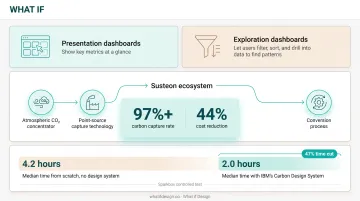
Interfaces this technical get expensive without shared patterns. Skipping a system entirely has a real cost, too. In a controlled test, Sparkbox found a 47% time cut: developers took a median of 4.2 hours from scratch versus 2.0 hours with IBM's Carbon system. That gap widens on technical teams, where engineers often ship interfaces with no design input at all.
2. Option 1: build your own design system in-house
Building means dedicating internal design and engineering time to create a fully custom component library, token system, and documentation from scratch. No shortcuts, no inherited constraints.
Build makes sense when the interface itself is a competitive differentiator. Think of a proprietary battery monitoring platform where state-of-charge visualizations, risk scoring, and warranty tracking are part of the product's actual value.
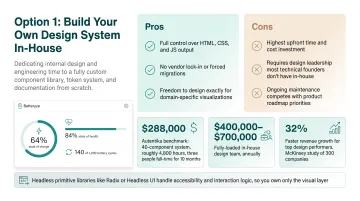
What if Design's work on Batteryze shows why. The dashboard tracks metrics like roughly 64% state of charge, roughly 84% state of health, and 140 of 1,200 battery cycles, none of which come pre-built in any component kit.
Pros:
- Full control over HTML, CSS, and JS output
- No vendor lock-in or forced migrations
- Freedom to design exactly for domain-specific visualizations
Cons:
- Highest upfront time and cost investment
- Requires design leadership most technical founders don't have in-house
- Ongoing maintenance competes with product roadmap priorities
On cost, benchmarks vary widely by scope. Autentika's model for a 40-component system estimates roughly 4,800 hours, or three people full-time for 10 months, about $288,000. RNO1 places a startup-MVP build (30-50 components) at 3-6 months of senior design time. Fully-loaded in-house teams often run $400,000, $700,000 annually.
That investment isn't purely a cost center. McKinsey's study of 300 global companies found top design performers grew revenue 32% faster than peers, with 56% higher shareholder returns over five years. Design maturity correlates with stronger business performance over time.
A practical shortcut: even within a "build" approach, you don't need to code every component from zero. Headless primitive libraries like Radix or Headless UI handle the accessibility and interaction logic for complex components (modals, selects, dropdowns) while you own the visual layer entirely. This cuts engineering burden without sacrificing design control.
💡 Working through this decision right now? If you're a climate-tech or deep-tech founder weighing this trade-off, Book a strategy call with our team, 25 minutes, no pitch, and we'll pressure-test your specific situation.
See how we have approached this in practice: Brand guidelines vs design systems.
3. Option 2: buy, component libraries, UI kits & existing systems
Buying means adopting an existing library like Shadcn, Chakra, Material, or Tailwind UI, then theming it to match your brand basics: colors, fonts, spacing.
The biggest pro is speed. These libraries ship with accessibility handled, components tested across browsers, and documentation already written. You're customizing, not inventing.
The catch for technical companies is real, though. Generic, templated interfaces risk undercommunicating scientific credibility.
A carbon capture company built on genuine research breakthroughs can look indistinguishable from any project-management SaaS tool if it leans entirely on default components. Sudarshan Gupta, COO of Susteon Sudarshan Gupta noted that thoughtful design work "forced us to reflect and rethink our corporate strategy" and helped the team "creatively visualize our deeply scientific work." That outcome is the opposite of what a stock template achieves.
Other practical downsides worth knowing:
- Overriding unwanted default behaviors eats into your time savings
- Unused CSS from the library can bloat your bundle size
- Version updates sometimes introduce breaking changes with little warning
This path fits best at pre-seed to seed stage, when you're validating an MVP on limited runway and need to ship, not polish a full visual system.
Design-only foundational kits from firms like Imperavi run $15,000 for a 3-4 week starter package covering 10-12 components, scaling to $35,000 for a more tailored premium version. Those packages are still Figma files, not coded output.
4. Option 3: partner with a design studio that understands your space
Partnering means engaging an external studio to build, theme, or evolve your design system with senior-level expertise, without the overhead of a full-time hire.
The difference from buying is depth. A specialized partner doesn't hand you a static component library. They customize the system around your specific technical narrative, translating carbon capture chemistry or grid interconnection data into a visual language that builds trust with engineers and investors alike.
4.1 Why this model exists for climate & deep tech
Off-the-shelf systems rarely fit climate and deep-tech products. The science is novel, buyers are technical, and writing the design brief itself is often hard, so a partner who can learn the domain before designing becomes the practical path.
What if Design built its practice around that gap. After a year speaking with more than 100 climate-focused founders and operators, the studio focused on climate tech, deep tech, and hard tech. The team now covers brand, website, and product design for companies backed by the US Department of Energy, ARPA-E, and leading climate VCs, including carbon capture (Susteon) and green hydrogen (HYDGEN).
Partnering tends to make the most sense at Series A and beyond, when internal teams lack the bandwidth or domain fluency to translate genuinely novel technology visually.
4.2 Evaluating a design partner
When assessing a studio for a technical product, look for:
- Domain-first process: do they learn the science and market before opening Figma, or jump straight to visuals?
- Relevant portfolio evidence: comparable work with regulated or deeply technical products, not just polished consumer apps
- Cross-discipline range: can they handle brand, web, and product design, not just an isolated UI kit?
- Fundraising-stage fluency: experience supporting pitch decks and investor-facing materials, not only shipped product
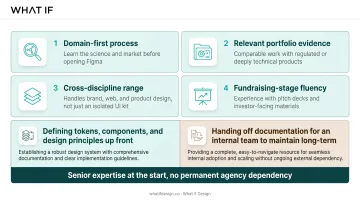
Many studios also offer a hybrid version: defining tokens, components, and design principles up front, then handing off documentation for an internal team to maintain long-term. This gives you senior expertise at the start without permanent agency dependency.
5. Decision framework: which path fits your stage & complexity
The right path depends on your stage, product complexity, and how much runway you have.
| Stage | Product Complexity | Recommended Path |
|---|---|---|
| Pre-seed / Seed | Simple, single surface | Buy and lightly customize |
| Series A+ | Multiple surfaces, investor scrutiny | Build or partner |
| Any stage | Scientifically/technically complex | Partner with domain specialists |
At pre-seed and seed, with a simple product and tight runway, default to buying an existing component library and theming it lightly. Speed matters more than polish right now.
At Series A and beyond, once you have multiple product surfaces or investors scrutinizing your interface, building or partnering typically pays for itself.
Migration gets expensive if you wait too long. RNO1 estimates that retrofitting a legacy, inconsistent UI into an organized system adds 40-roughly 60% to build time and cost, and supporting multiple platforms can multiply that by 3-4 times.
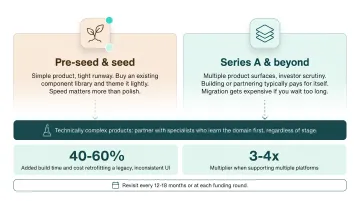
For scientifically or technically complex products, partnering with specialists who learn the domain first usually outperforms a purely generic build or buy approach, regardless of stage.
Revisit this decision every 12-18 months or at each funding round. Team capacity, product complexity, and stakeholder expectations shift faster than most founders plan for.
A site that reflects the company you have actually become is the cheapest credibility you can buy, and it puts you back in control of the first impression. Get a free strategic audit.
6. Frequently asked questions
6.1 Is a design system worth the investment?
Yes, in most cases. The upfront cost is real, but the ongoing cost of not having one (design debt, slower handoffs, and inconsistent brand trust) usually runs higher once you scale past your first product.
6.2 What is build vs. buy?
Choose build when your product UX is a core differentiator and no library fits without heavy rework. Choose buy when speed and cost matter more than deep customization, and an existing library covers most patterns you need.
6.3 What's the difference between build, buy, and partner for design systems?
Build is full in-house creation. Buy is adopting existing component libraries. Partner means bringing in an external studio for senior-level expertise without a full-time hire.
6.4 How much does a design system typically cost?
Costs scale with stage and scope. Design-only starter kits run around $15,000; coded MVP systems typically land between $80,000 and $180,000; enterprise-level systems can exceed $300,000.
6.5 Can an early-stage startup use an off-the-shelf design system?
Yes. Most early-stage teams should start with a lightly customized open-source component library to conserve runway and move fast, then revisit as complexity grows.
6.6 When should you bring in a design partner instead of hiring in-house?
Partnering makes sense when you need senior design expertise quickly, especially for technically complex products, without the time or overhead of a full-time hire.
Ready to take the next step?
If you're weighing a design partner for climate, deep tech, or hard-to-explain products, Book a strategy call with our founders at What if Design, a no-pressure 25-minute conversation about what you're building and where design can help. You can also View our work to see how we've helped teams like yours, or Get a free strategic Audit of your current brand, website, or product experience.