This shift matters most for products where the stakes are high and the data is dense, like climate tech dashboards, battery diagnostics, or grid-interconnection tools. Get the interface wrong here, and users don't just get frustrated. They lose trust in the underlying science.
Product leaders who act on these shifts now make sharper investment calls, skip costly redesigns, and earn user trust that is hard to fake later.
This article covers the five defining AI UI trends of 2026: what drives them, how they reshape product decisions, and how to prepare before a redesign becomes urgent.
TL;DR: key takeaways
- Interfaces are moving from fixed layouts to real-time generative and adaptive experiences.
- Trust-by-design, visible reasoning and clear limits, now matters as much as usability.
- Agentic, non-command interaction is a new UI paradigm beyond chat-style wrappers.
- Technical and regulated products gain the most from AI UI when trust and compliance are designed in.
- Designers need hybrid skills spanning prompt design, data literacy, and cross-disciplinary collaboration.
1. Key AI UI design trends shaping 2026
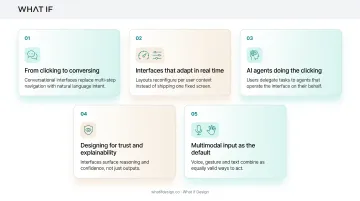
Five shifts define how interfaces are being built and experienced this year. Each one changes a different assumption about what a UI is supposed to do.
1.1 Generative & real-time adaptive UI
Interfaces used to come from a fixed template library. Now they're generated on the fly, reconfigured from a prompt, a dataset, or the context a user brings into the session.
Tools like Figma Make, Google Stitch, and Uizard's Autodesigner turn a plain-language prompt into an editable, brand-aware mockup in seconds: layout, components, spacing, and responsiveness already applied.
Stitch also accepts an image or existing code as canvas context, so teams iterate on something that already resembles their product instead of a blank frame.
In a randomized controlled trial with 100 product designers and managers, Figma found that access to Make cut cumulative task-completion time by 20% and improved perceived usability by 15%. Product managers saw even larger time gains on standard tasks.
That measured lift is why generative UI tools are moving from side experiments into the default product toolkit.
1.2 Agentic & non-command interfaces
Nielsen Norman Group calls this the third UI paradigm in sixty years: intent-based outcome specification. Instead of clicking through a sequence of commands, users state what outcome they want, and the system figures out how to get there.
Gmail's Gemini-powered features illustrate this well. Suggested replies now draft responses that match how a user actually writes, based on conversation context, and thread summaries surface the point of a long email chain without anyone asking for one. No explicit command triggers either action.
Enterprise adoption is real but still early. McKinsey found 23% of organizations were scaling an agentic AI system somewhere, though no single business function had scaled agents past roughly 10%. Translation: agentic interaction is arriving fast, but full autonomy across a workflow is still rare. Design accordingly, with previews, correction paths, and clear user control built in from day one.
1.3 Multimodal interaction design
Voice, text, image, and video are merging into a single fluid interaction instead of living in separate modes. A user might snap a photo, ask a spoken question about it, and get a text-and-visual answer back, all in one exchange.
Google's Lens tool now handles billions of visual searches every month and lets people photograph an object, then ask a follow-up question out loud. That kind of modality-switching is becoming the expectation, not the exception.
Multimodal design is also an accessibility win. The same task can ship through different input paths:
- Captions and text alternatives for screen-reader and low-vision users
- Alternative controls for motor-impairment users
- Simplified language layered on the core interaction
For global products, those paths also lower the language and literacy barriers pure text interfaces create.
1.4 Explainable AI (XAI) & trust-by-design
An interface that just outputs an answer, with no reasoning attached, is a harder sell in 2026 than it was two years ago. Users want to see confidence levels, know the limitations, and understand why the system made a particular call.
ChatGPT now offers optional reasoning summaries alongside answers rather than raw internal reasoning. Netflix has long framed its recommendations with "because you watched" style explanations tied to viewing history and ratings. Neither approach is perfect, but both give users something to evaluate instead of a black box.
The gap between what companies disclose and what users want is still wide. PwC found only 33% of executives said their companies disclose their AI governance framework, even though 69% of employees and 66% of consumers said that disclosure matters to them.
For health, finance, and climate products, where a wrong or opaque AI output has real consequences, closing that gap is required for adoption, not optional polish.
1.5 Emotion-aware hyper-personalization
Beyond click history, some interfaces now adapt tone, pacing, and content based on inferred emotional signals from voice or facial cues. Hume's Empathic Voice Interface, for instance, reads vocal tone and expression to adjust both wording and delivery mid-conversation.
Done well, this kind of personalization pays off. Research from McKinsey links strong personalization to double-digit revenue gains and higher repurchase likelihood. Done carelessly, it becomes invasive fast.
Treat inferred emotion as a probabilistic signal, not a fact. The EU AI Act now requires notice whenever a system uses emotion recognition, and restricts some uses outright. Build in a correction path, always, so users can override what the system assumes about their mood.
If your site hasn't kept pace with where the business actually is, we can show you what that's costing you. Get a free strategic audit.
2. What's driving these AI UI design trends
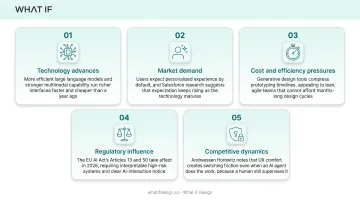
None of this is happening because it's trendy. Five forces: spanning technology, economics, and regulation, are pushing it forward at the same time.
- Technology advances: More efficient large language models and stronger multimodal capability mean richer interfaces can run faster and cheaper than they could even a year ago.
- Market demand: Users expect personalized experiences by default. Salesforce research suggests most customers expect that personalization to keep improving as the technology matures.
- Cost and efficiency pressures: Generative design tools compress prototyping timelines, which appeals to lean, agile teams that can't afford months-long design cycles.
- Regulatory influence: The EU AI Act's Articles 13 and 50 take effect in 2026. They require interpretable high-risk systems and clear notice when someone interacts with AI, making explainability a design requirement.
- Competitive dynamics: Investors increasingly treat a familiar, well-designed AI workflow as a moat. Andreessen Horowitz notes that UX comfort creates switching friction even when an AI agent does the underlying work, because a human still has to supervise and trust it.
3. How these trends are impacting businesses & products
These shifts reach further than the design team's Figma files. They're reshaping workflows, budgets, and hiring plans across the business.
3.1 Operational impact
Design and engineering are converging. Teams now iterate together on non-deterministic AI outputs instead of handing off a fixed spec and waiting. That changes the rhythm of sprints.
Design systems need new components that didn't exist a few years ago:
- Confidence indicators showing how certain an AI output is
- Error states specific to AI failure modes, not just broken forms
- Feedback loops that let users correct or flag bad outputs in place
3.2 Business impact
Investment priorities are shifting toward AI-native product experiences. Investors are starting to evaluate UX maturity alongside raw technical capability. For enterprise AI products especially, daily workflow fit often decides whether customers stick around.
That doesn't mean a slick interface guarantees funding. But a product where users trust and understand the AI's output is a materially easier sell in due diligence than one where the model is a black box bolted onto a dashboard.
3.3 Workforce impact
Designers now need skills that rarely appeared on job descriptions three years ago:
- Prompt design for steering model behavior in product flows
- Explainability literacy so outputs can be justified to users
- Day-to-day collaboration with data science and ML teams
Hybrid roles like "AI UX strategist" are emerging to bridge product, data, and design.
4. How to prepare your product for AI-native UI design
Getting ahead of these trends doesn't require a full rebuild overnight. It requires an honest audit and a willingness to start small.
- Audit for static assumptions. Look for fixed flows and one-size-fits-all dashboards that assume every user has the same needs and technical background. Climate tech and deep-tech products especially tend to serve users with wildly different proficiency levels, from plant operators to investors. 2. Prioritize trust and explainability early. This matters most for technical, scientific, or regulated products where users need to understand why the AI reached a conclusion, not just what the conclusion was. 3. Build modular design systems. Fixed, tightly specified screens don't hold up against generative and adaptive layouts.
Component libraries, design tokens, and flexible grids do. 4. Work with partners who understand both the science and the user. Translating deeply technical systems into intuitive interfaces takes more than visual polish. It takes a team willing to learn the underlying complexity first. 5. Start small. Pilot one adaptive or personalized AI feature before a full redesign. Measure impact on engagement and retention, then expand.
Those last two points are where many technical teams stall: finding partners who can translate the science, and shipping one focused fix before a platform overhaul.
For Batteryze's battery-management platform, state-of-health scores, cycle counts, and material-value data had to make sense to fleet owners and insurers who aren't battery engineers. Clear dashboard views put health scores like an 84 ("Good") rating next to usage data so a non-specialist could decide on retirement or replacement without a battery science degree.
For HYDGEN, a hydrogen electrolyzer company, the original site buried specs like 99.roughly 97% hydrogen purity in dense text. The redesign used annotated 3D illustrations and labeled callouts such as "Modular & Scalable" and "Effortless Maintenance," so investors and partners could read the tech without losing substance.
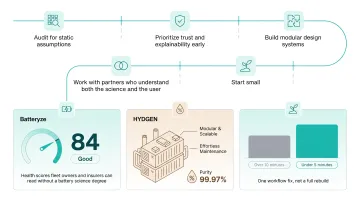
A climate-tech monitoring redesign followed the same start-small pattern: one workflow fix cut report-generation time from over 10 minutes to under 5, not a full platform rebuild.
5. Conclusion
AI UI design in 2026 is defined by a move away from static, fixed interfaces toward experiences that generate themselves, act on intent, and explain their own reasoning. These are no longer optional extras. They are baseline user expectations.
Teams shipping complex or technical products have the most to gain from getting this right early, and the most to lose from getting it wrong. Trust, once broken by an opaque or confusing AI interaction, is expensive to rebuild.
Agentic interfaces will keep maturing well beyond 2026, and stricter transparency rules will push explainability from a design choice into a legal requirement in more markets. Treat both as product requirements now, not polish to add later.
Clarity here is what turns a defensive conversation into a confident one. Get a free strategic audit.
6. Frequently asked questions
6.1 What is AI UI design?
AI UI design refers to interfaces that use machine learning and generative models to adapt, personalize, and respond to users dynamically, rather than following a fixed layout. The interface itself becomes part of the intelligence, not just a window into it.
6.2 Will AI replace UX/UI designers in 2026?
No. AI handles repetitive, data-heavy production work like layout variations and component drafts. Designers stay on strategy, empathy, and judgment calls AI can't make. The role is shifting, not disappearing.
6.3 What's the difference between adaptive UI and generative UI?
Adaptive UI adjusts an existing layout based on user behavior, like reordering a dashboard's widgets. Generative UI creates entirely new layouts in real time from a prompt or context, often with no pre-built template underneath it at all.
6.4 How do I make AI interfaces feel trustworthy to users?
Surface the AI's reasoning, confidence level, and known limitations directly in the interface, rather than presenting outputs as absolute fact. Give users a clear way to question, correct, or override the system when something looks wrong.
6.5 What skills do designers need for AI-native interfaces?
Designers need prompt design skills, explainability (XAI) literacy, and much closer collaboration with engineering and data science teams. Understanding roughly how a model reaches its output matters more now than it used to.
6.6 How can technical or scientific products design AI interfaces that non-experts can trust?
Simplify complex outputs into clear visual hierarchies and prioritize transparency over technical completeness. Translate deep technical detail: battery data, hydrogen system specs, sensor feeds, into interfaces non-experts can actually act on.
Related reading: UI design research for climate tech and 10 usability heuristics.
Ready to take the next step?
If you're weighing a design partner for climate, deep tech, or hard-to-explain products, Book a strategy call with our founders at What if Design, a no-pressure 25-minute conversation about what you're building and where design can help. You can also View our work to see how we've helped teams like yours, or Get a free strategic Audit of your current brand, website, or product experience.