Where What if Design fits in We're a senior-led creative studio built specifically for climate tech, clean tech, and deep tech founders. Since 2020, we've partnered with teams like HYDGEN, Ribbit Network, and Susteon to turn hard-to-explain technology into brands, websites, and product experiences that raise capital and win adoption. This comparison reflects how we evaluate the trade-offs when a founder asks us which route to take.
B2B SaaS founders and climate tech teams hit the same fork in the road eventually: build the marketing site on Webflow or WordPress? The decision feels small until it isn't.
Pick wrong, and you're stuck waiting on a developer to update a pricing page before a board meeting. Or worse, patching a plugin vulnerability the week before a Series A close.
The stakes are real. Site speed alone can swing B2B conversion rates by more than 10 percentage points. Portent's analysis of 14 B2B lead-generation sites found conversion rates near 40% at a 1-second load time, dropping to roughly 29% at 3 seconds.
This article breaks down where each platform wins, and how the choice should map to your team, not a feature checklist.
TL;DR: key takeaways
- Webflow favors design speed and marketing independence; WordPress favors plugin-driven content flexibility
- Shipping speed, lower security overhead, and design fidelity usually favor Webflow for fast-moving B2B teams
- WordPress wins with strong in-house engineering, massive content libraries, or complex ecommerce
- The right pick depends on team composition and company stage, not a side-by-side spec sheet
- For most seed-to-Series A B2B SaaS and deep-tech companies, Webflow lowers total cost of ownership
1. Webflow vs. WordPress: quick comparison
Here's the short version, factor by factor:
| Factor | Webflow | WordPress |
|---|---|---|
| Cost | Premium plan runs $25/month billed annually; Enterprise is custom | Free core software, but hosting, premium plugins, and developer time add up fast |
| Design fidelity | Pixel-level control on a visual canvas; no theme constraints | Design quality depends on the theme; custom work needs a developer |
| Security & maintenance | Managed hosting, automatic SSL, backups, SOC 2 Type II audited | Self-hosted. The operator patches core, plugins, and themes |
| CMS scalability | Up to 20,000 CMS items on Premium and Team plans | Effectively unlimited, but heavy plugin stacks can slow the database |
| Ideal team fit | Marketing-led teams that need to publish without waiting on engineering | Engineering-led teams with dedicated WordPress resources |
Webflow trades architectural flexibility for speed and predictability. WordPress trades upfront simplicity for long-term control, as long as you have the staff to manage it.
2. Understanding Webflow and WordPress
2.1 What is Webflow?
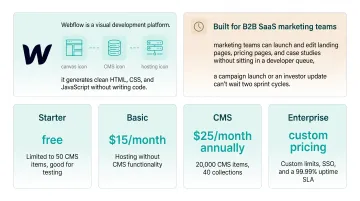
Webflow is a visual development platform. It combines a design canvas, a built-in CMS, and managed hosting, and it generates clean HTML, CSS, and JavaScript without writing code.
For B2B SaaS, this matters practically: marketing teams can launch and edit landing pages, pricing pages, and case studies without sitting in a developer queue. That's a big deal when a campaign launch or an investor update can't wait two sprint cycles.
Webflow's plans scale with need:
- Starter: free, limited to 50 CMS items, good for testing
- Basic: $15/month, hosting without CMS functionality
- CMS: $25/month annually, 20,000 CMS items, 40 collections
- Enterprise: custom pricing, custom limits, SSO, and a 99.roughly 99% uptime SLA
2.2 Use cases of Webflow
Webflow tends to show up wherever a marketing team needs to move fast without waiting on engineering:
- Campaign landing pages
- Product launch pages
- Pitch-deck visuals turned into a live site the same week
It's especially common among design-led SaaS companies, fintech, and technical or deep-tech startups that need to explain complex science to non-technical stakeholders (investors, enterprise buyers, partners) quickly and credibly.
A real example from our own work: Susteon, a carbon-capture and hydrogen-production company, came to What if Design with a site that wasn't translating its technology to investors and partners. We rebuilt it on Webflow over a 4-month engagement, adding interactive explanations and simple animations to make the science tangible.
The redesign contributed to a 30% increase in career applicants compared to the previous site: a direct signal that clearer communication changes how people respond, not just how a page looks.
2.3 What is WordPress?
WordPress started in 2003 as a blogging tool. Two decades later, it's a general-purpose, open-source CMS running on a theme-and-plugin architecture that lets almost anyone extend it.
For B2B teams, the core benefit is depth: with dedicated engineering resources, WordPress can support highly custom functionality that off-the-shelf platforms can't match. A newer variation, headless WordPress, keeps the familiar editorial backend while serving content to a separately built frontend through the REST API, useful for teams that want editorial flexibility without sacrificing frontend performance.
2.4 Use cases of WordPress
WordPress remains the default choice in a few specific situations:
- Complex ecommerce built on WooCommerce
- Large, content-driven resource centers or blogs publishing at high volume
- Organizations with an existing in-house WordPress engineering team
Its scale is hard to argue with. WordPress still powers 40.8% of all websites, or 59% of the CMS market, according to W3Techs. That incumbency is real.
The tradeoff is exposure: Patchstack's 2026 security report identified 11,334 new WordPress ecosystem vulnerabilities in 2025, a 42% jump from the year before, with 91% traced to plugins rather than WordPress core. Flexibility and exposure tend to grow together on this platform.
💡 Working through this decision right now? If you're a climate-tech or deep-tech founder weighing this trade-off, Book a strategy call with our team, 25 minutes, no pitch, and we'll pressure-test your specific situation.
See how we have approached this in practice: Top Webflow development agencies for SaaS companies in 2026.
How we evaluated the options
Every recommendation here comes from actual client work, brand systems shipped, websites launched, and product experiences delivered under fundraising deadlines. We compared the options against five criteria that matter most for technical founders:
- Total cost of ownership across the first 12 months (not just the sticker price)
- Speed to a usable output given a typical Series A runway
- Quality of the technical translation, can they explain your science without oversimplifying it?
- Rework risk, how often teams re-hire because the first choice couldn't scale
- Ability to move with the roadmap without a re-onboarding tax every quarter
Where we cite numbers or trade-offs below, they come from projects we've delivered or watched founders navigate first-hand.
3. Webflow vs. WordPress: what is better for B2B SaaS?
The right answer depends on five things:
- Team composition: marketing-led or engineering-led
- Content volume and complexity: a handful of core pages or thousands of articles
- Security and compliance requirements: especially for regulated or enterprise buyers
- Total cost of ownership over 2 to 3 years: not just sticker price
- Iteration speed: how fast campaigns and pages need to ship
Choose Webflow if your marketing team needs operational independence and the website is your primary demand-generation or investor-facing asset. This is the more common profile for funded B2B SaaS and climate tech companies moving fast between raises.
Choose WordPress if you have dedicated engineering resources, a very large existing content library, or complex ecommerce requirements that justify the maintenance overhead.
By stage, the pattern looks like this:
- Pre-seed / bootstrapped: Webflow's low entry cost and no-code speed make sense with a lean team
- Seed: Webflow still wins for most, marketing needs to move faster than a small engineering team can support
- Series A and beyond: The decision splits based on whether engineering headcount and content complexity have grown enough to justify WordPress's overhead
Stage and team fit matter, but they are not the whole story. For technical, science-heavy companies in climate tech, deep tech, or hard-to-explain hardware, the platform question is often secondary. The harder problem is turning complex technology into something an investor or enterprise buyer can understand in 30 seconds. That translation work is what What if Design focuses on with clients, on whichever platform fits their team and stage.
4. Real-world example: choosing the right platform
Lattice, a B2B HR software company, is one of the clearer public examples of this decision. Lattice originally built its site on Webflow in 2018, moved to WordPress, and later switched back to Webflow Enterprise.
According to Webflow's customer case study, the WordPress period cost Lattice a full year trying to ship a rebrand. Design and mobile limitations, costly plugins, ongoing developer maintenance, and scarce engineering capacity slowed nearly everything down.
The trigger for switching back: Lattice was expanding from a single talent-management tool into a broader HR platform, and its site needed to keep pace. It needed marketing, design, and content teams working directly in the CMS, without a developer as the bottleneck.
The results after the switch:
- The rebranded site launched in two weeks
- Work that took two weeks in WordPress took a few days in Webflow
- The team ran 6 to 8 tests every six weeks
- Site-wide conversion rose roughly 20%, and organic traffic rose roughly 20%
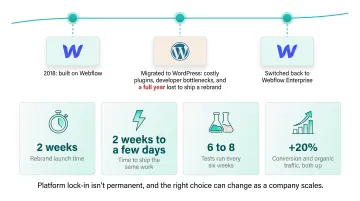
The takeaway: Platform lock-in isn't permanent, and the right choice can change as a company scales.
When a funded technical B2B team needs a fast, credible site without standing up an internal design and development bench, partnering beats hiring for many shops. What if Design covers that path end to end, from brand to website to product, at roughly a third the cost of in-house senior designers.
Which option is right for your stage
The right answer depends less on the two options themselves and more on where you are as a company.
Pre-seed / seed (0–$3M raised): Speed and story matter more than polish. A focused boutique-agency sprint usually beats an in-house hire, because the founder still needs to control the narrative. We've seen this pattern with early climate-tech teams, a 4-to-6-week engagement to get brand, website, and pitch coherent is more valuable than a full-time designer.
Series A ($5–20M raised): This is where a senior-led agency partner pays for itself. You need a brand system that will survive three product pivots, a website that converts enterprise buyers, and pitch materials that hold up in board meetings. In-house is still premature unless you're planning to ship design-heavy product weekly.
Series B and beyond ($20M+ raised): Hire in-house design leadership and keep an agency partner for concentrated bursts (rebrands, launches, category shifts). The two aren't substitutes at this stage, they solve different problems.
Growth-stage climate tech specifically: The stakes shift once you're commercializing. Your brand needs to hold up to procurement diligence, regulatory scrutiny, and investor updates simultaneously. A specialist studio that already speaks the science, like our team, reduces the translation tax that generalists impose on every deliverable.
5. Conclusion
No single winner fits every B2B SaaS team. Webflow suits marketing-led teams that need to ship pages fast without a developer between every idea and a live URL. WordPress still makes sense when you have real engineering depth, a large content library, or complexity that justifies the maintenance load.
At seed through Series A, the choice usually comes down to three outcomes:
- How fast you can iterate on campaigns
- How much ongoing overhead you can absorb
- Whether the site can keep pace with fundraising and sales cycles happening now
Choose the stack that matches your team and stage, not the one with the louder fan base.
When the story is clear, the next conversation starts from confidence rather than explanation. Get a free strategic audit.
6. Frequently asked questions
6.1 Is Webflow better than WordPress?
For most marketing-led B2B SaaS teams, Webflow wins on shipping speed, design fidelity, and lower security overhead. WordPress remains stronger for teams with deep engineering resources or complex content and ecommerce needs.
6.2 Is Webflow good for B2B SaaS websites?
Yes. Webflow lets marketing teams publish and iterate without developer dependency, which is the biggest constraint most growth-stage teams face. That independence usually matters more than any single feature.
6.3 Which is cheaper for a B2B SaaS company, Webflow or WordPress?
WordPress has a lower entry cost but higher variable maintenance cost as you scale. Webflow's subscription pricing is more predictable once you factor in hosting, plugins, and developer time on the WordPress side.
6.4 Can I migrate from WordPress to Webflow without losing SEO rankings?
Yes, with proper planning. Map every old URL to its most relevant new destination and use permanent 301 redirects. Careless or incomplete URL mapping is where most migrations actually lose rankings.
6.5 Is Webflow secure enough for regulated or enterprise B2B SaaS companies?
Webflow's managed infrastructure removes the plugin-driven vulnerability layer that affects WordPress, and the platform is SOC 2 Type II audited and ISO 27001 certified. Always verify specific compliance requirements against your chosen plan.
6.6 Does WordPress still make sense for a growing SaaS company in 2026?
Yes, if you have strong in-house WordPress expertise, a large content library, or complex ecommerce needs. It just requires continued investment to stay secure and performant as plugin vulnerabilities keep climbing.
Ready to take the next step?
If you're weighing a design partner for climate, deep tech, or hard-to-explain products, Book a strategy call with our founders at What if Design, a no-pressure 25-minute conversation about what you're building and where design can help. You can also View our work to see how we've helped teams like yours, or Get a free strategic Audit of your current brand, website, or product experience.